
Material Requirements Planning (MRP)
The purchasing clerk’s screen every morning: it answers "what do I buy today, how much, and why?". It compares current stock with what you need from three sources, shows the shortage, and creates a Purchase Request to the product’s default supplier in one click.
Overview
| Demand source | What it works out |
|---|---|
| Minimum stock level | Ready products and raw materials whose stock is under their minimum in Stock Levels. Shortage = minimum − stock |
| Sales Orders | Sales orders whose delivery date is the selected day and that are not invoiced yet. Shortage = quantity ordered − stock |
| Production Components Shortage | For manufactured products: need = minimum + that day’s sales orders − stock, then the bill of materials breaks it down into raw materials and shows which are short |
Steps
- Choose the Warehouse, the Date (the day you are planning for) and the Demand Source, then click View.
- Go through the Unified Actions List: for each product the source, the Available quantity, the Shortage and the Status.
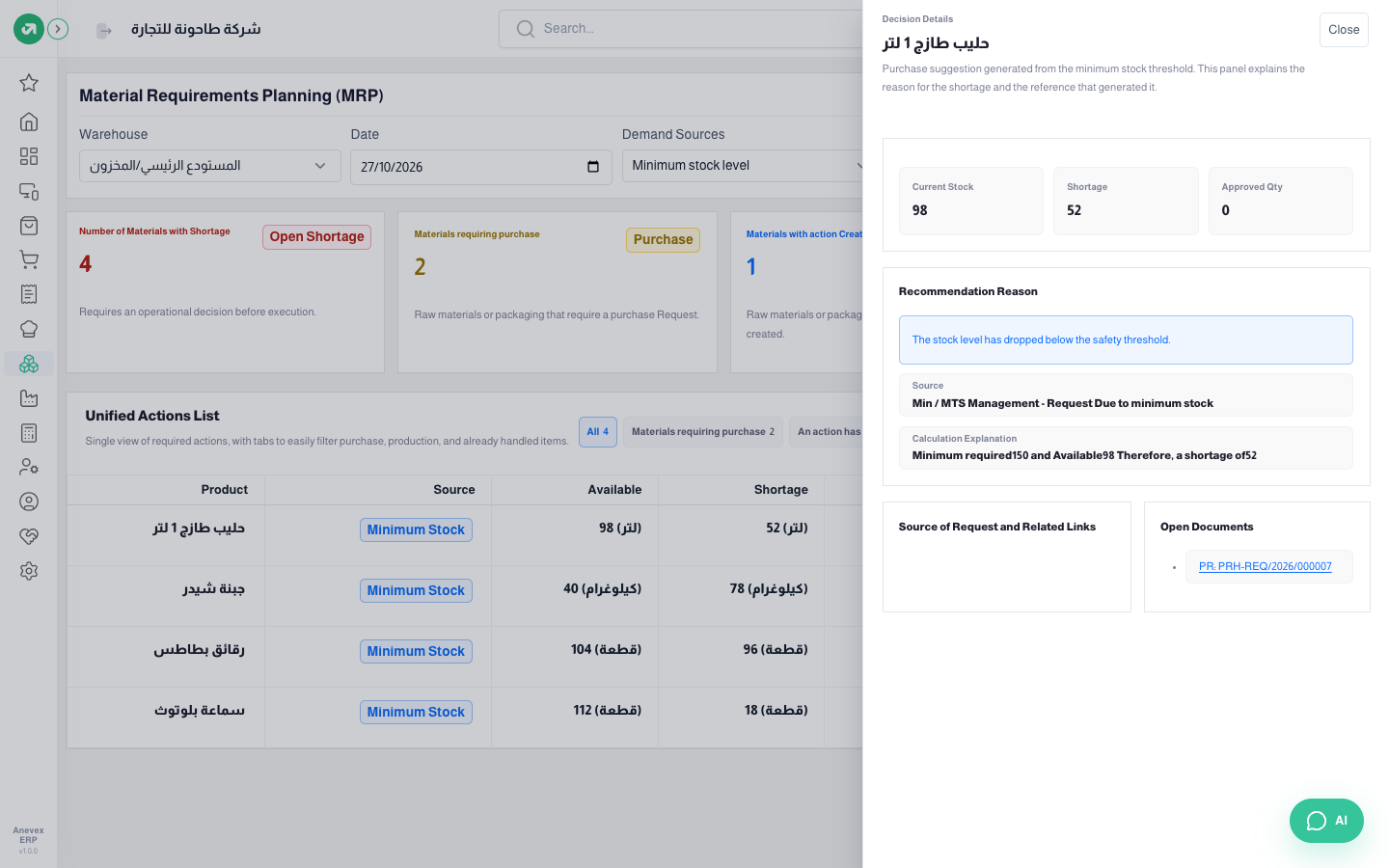
- Click Details to see why it is short, how it was worked out and the open documents linked to it.
- Click Purchase Request to create a purchase requisition for the shortage to the product’s default supplier. The status changes to Pending Approval.
- In Purchase Requisitions the manager approves the request and it becomes a Purchase Order; the status in MRP changes to PR Created.
| Status | Meaning |
|---|---|
| Needs Purchase | There is a shortage and nothing has been done yet |
| Pending Approval | A purchase requisition was raised that day and is not approved yet |
| PR Created | The requisition was approved into a purchase order |
Worked example 1: the morning of 27 October, minimum stock
The purchasing clerk opens MRP on the main warehouse with Minimum stock level. Four products are under their minimum:
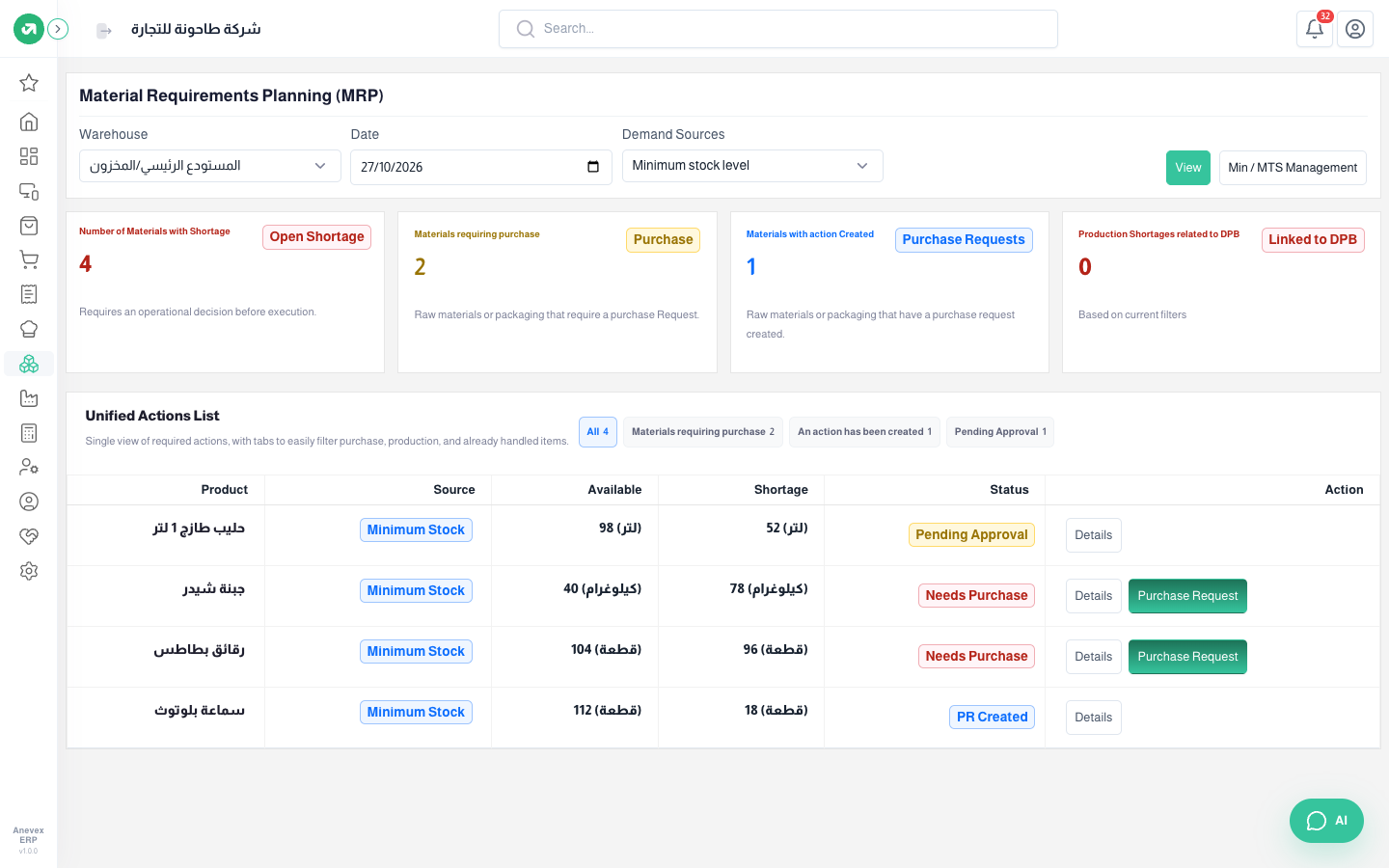
- Fresh Milk 1L: minimum 150, stock 98, so 52 litres short. The clerk clicked Purchase Request, which raised PRH-REQ/2026/000007 to Al Waha Foods for 52 litres; the status is now Pending Approval.
- Bluetooth Earbuds: minimum 130, stock 112, so 18 pieces short. The requisition was approved into purchase order PRH-ORD/2026/000015 to Tech Plus; the status is PR Created.
- Cheddar Cheese (78 kg short) and Potato Chips (96 short): Needs Purchase, with the Purchase Request button beside them.
Worked example 2: a sales order due on 28 October
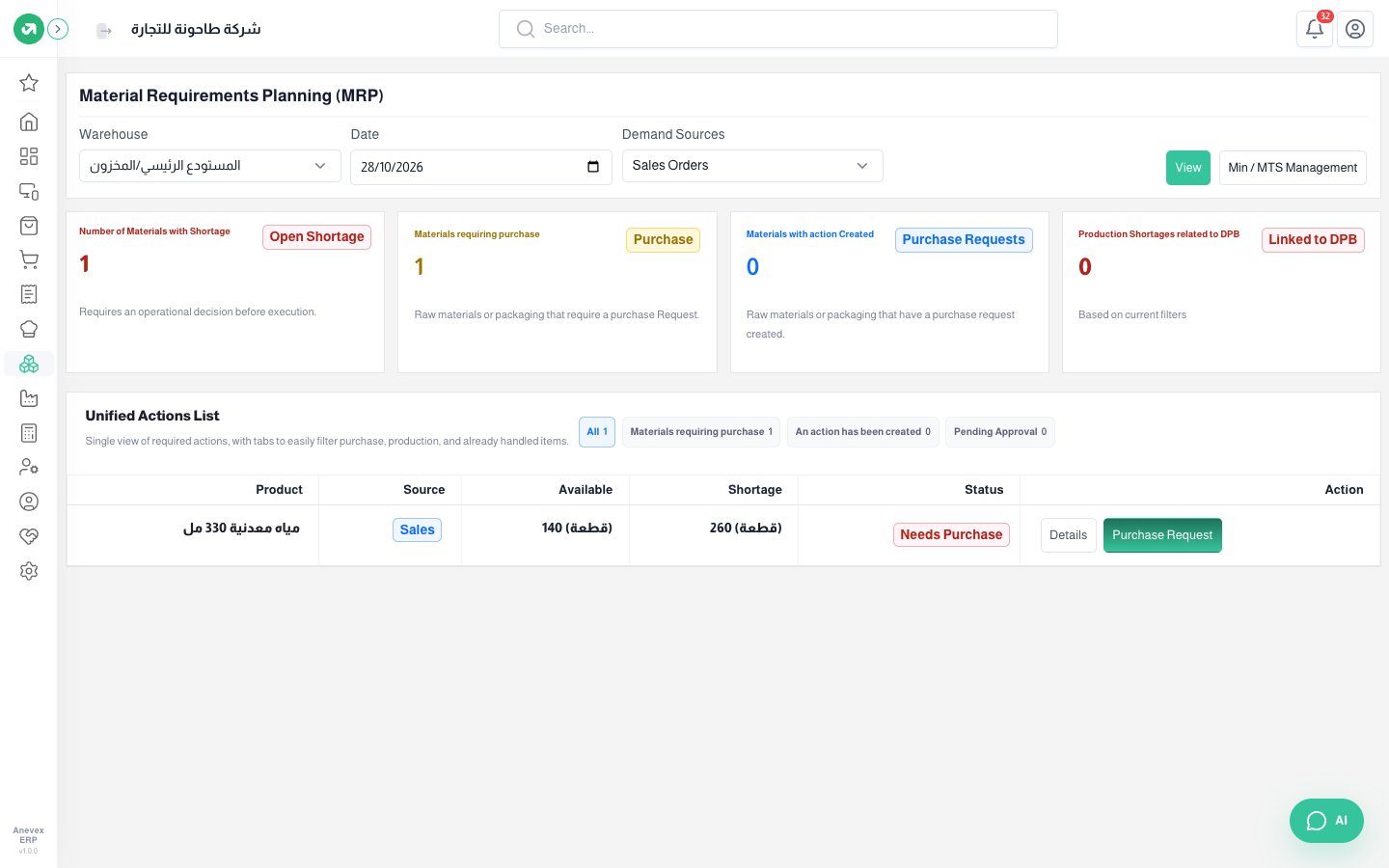
Al Reem Hotel ordered 400 bottles of mineral water for delivery on 28 October (sales order SALRD/2026/000012), and only 140 are in stock. With date 28/10 and source Sales Orders, MRP shows 260 bottles short to buy before delivery.
Worked example 3: raw materials for the hotel’s order
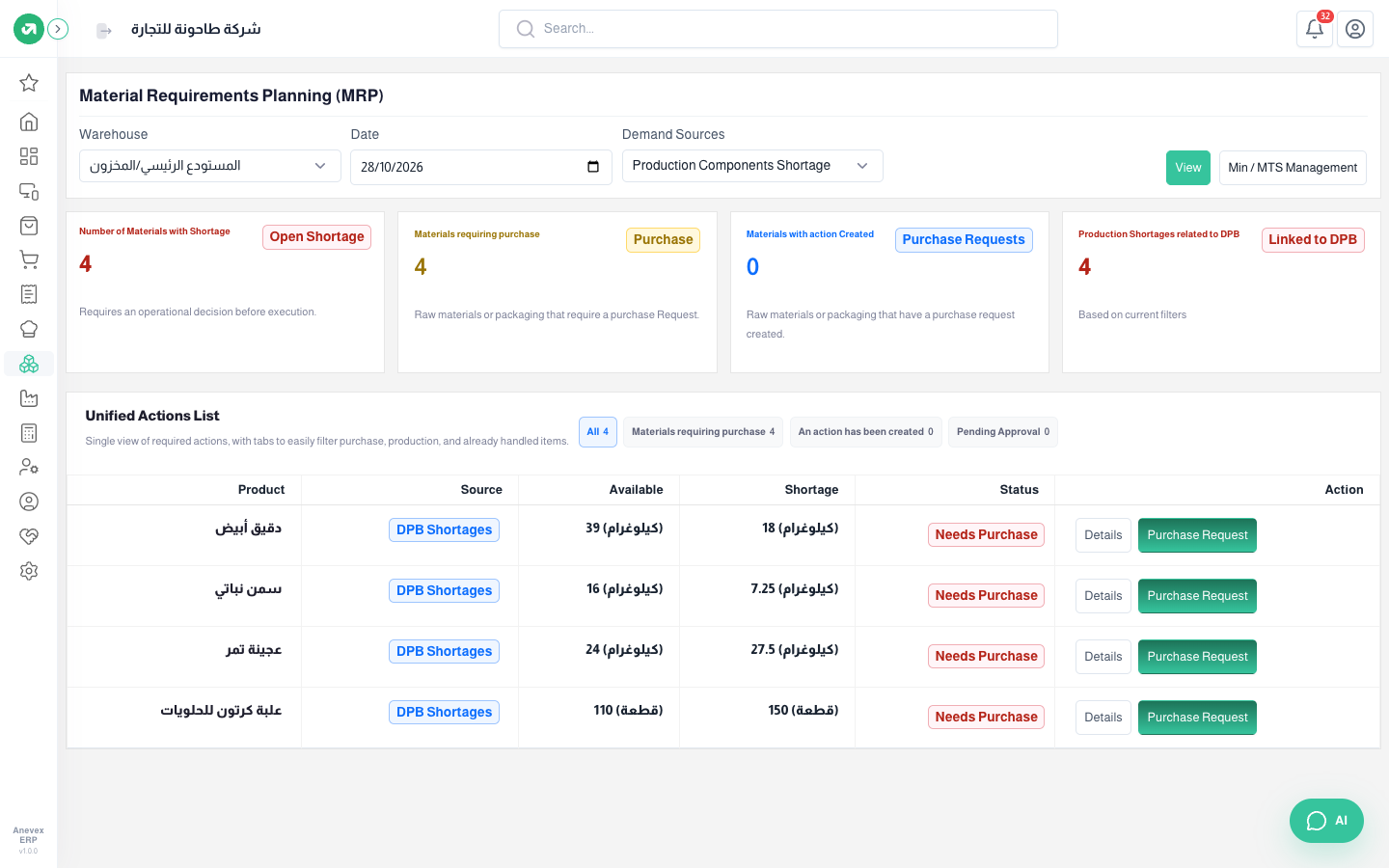
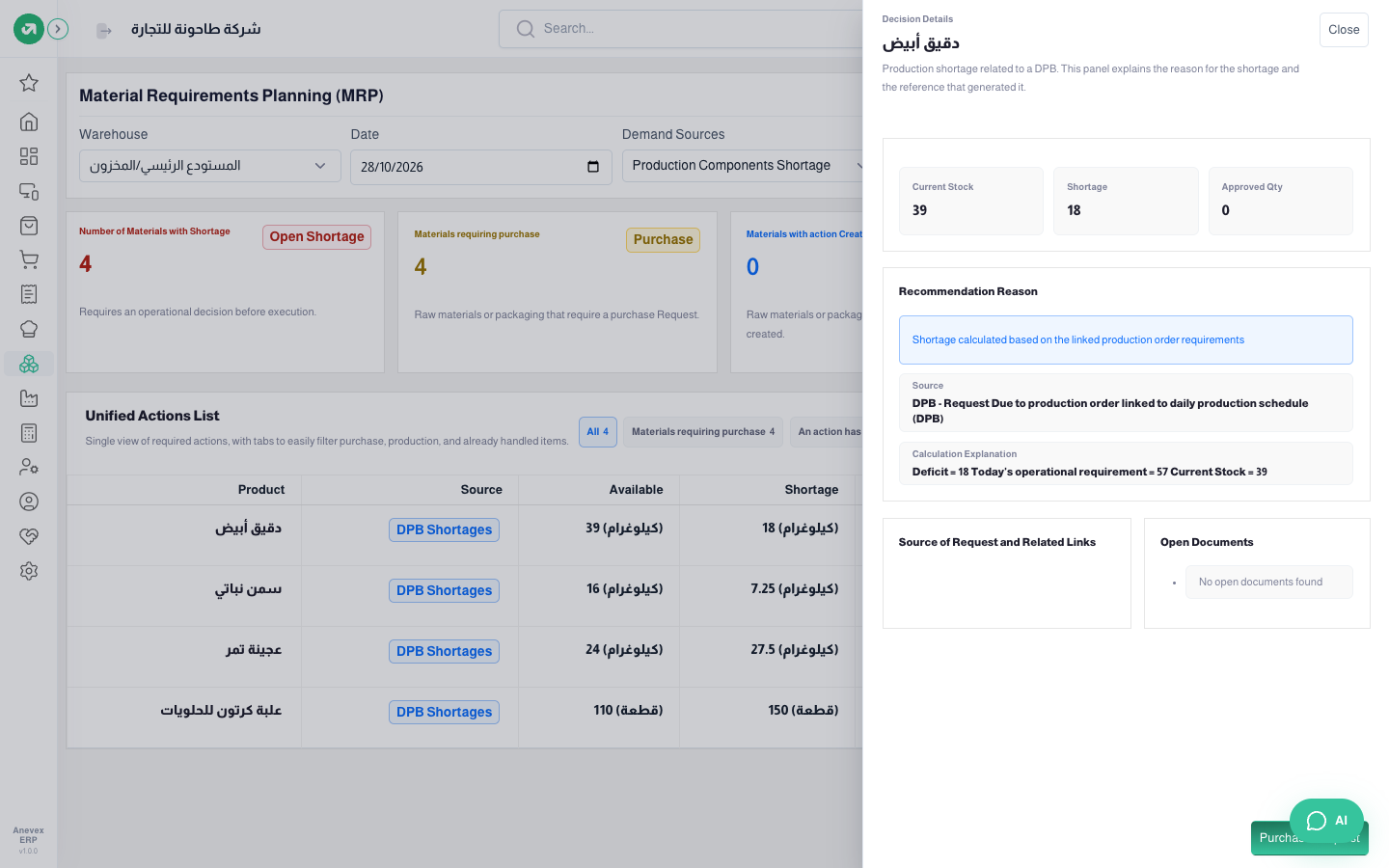
The same order has 150 boxes of date ka’ak and 40 boxes of maamoul, both manufactured. MRP with Production Components Shortage for 28/10 works out:
- Ka’ak: minimum 120 + the hotel’s 150 − 60 in stock = 210 boxes to make.
- Maamoul: minimum 40 + the order’s 40 − 30 in stock = 50 boxes.
- With the bills of materials (4 kg of flour per 20 boxes of ka’ak, 3 kg per 10 boxes of maamoul) you need 42 + 15 = 57 kg of flour; 39 are in stock, so 18 kg short.
- The same way: vegetable ghee 7.25 kg, date paste 27.5 kg and 150 carton boxes. There is enough sugar, so it is not listed.
Notes
- The Purchase Request button needs the product to have a default supplier and a purchase unit on the product screen; otherwise a message asks you to set them.
- The request is written in the purchase unit. If the purchase unit is a box and the shortage is in pieces, check the quantity and price on the requisition before approving it.
- MRP looks at one day: "Pending Approval" and "PR Created" show for requisitions raised on the selected date. Purchase orders already on the way are not deducted from the shortage, so check open Purchase Orders before ordering again.
- Min / MTS Management takes you to Stock Levels to change the minimums.