
Closing the session
At the end of the shift press the exit icon at the bottom of the side menu (or F10). The Pos Cash Drawer screen opens.
Overview
Where to find itPOSCashier screen
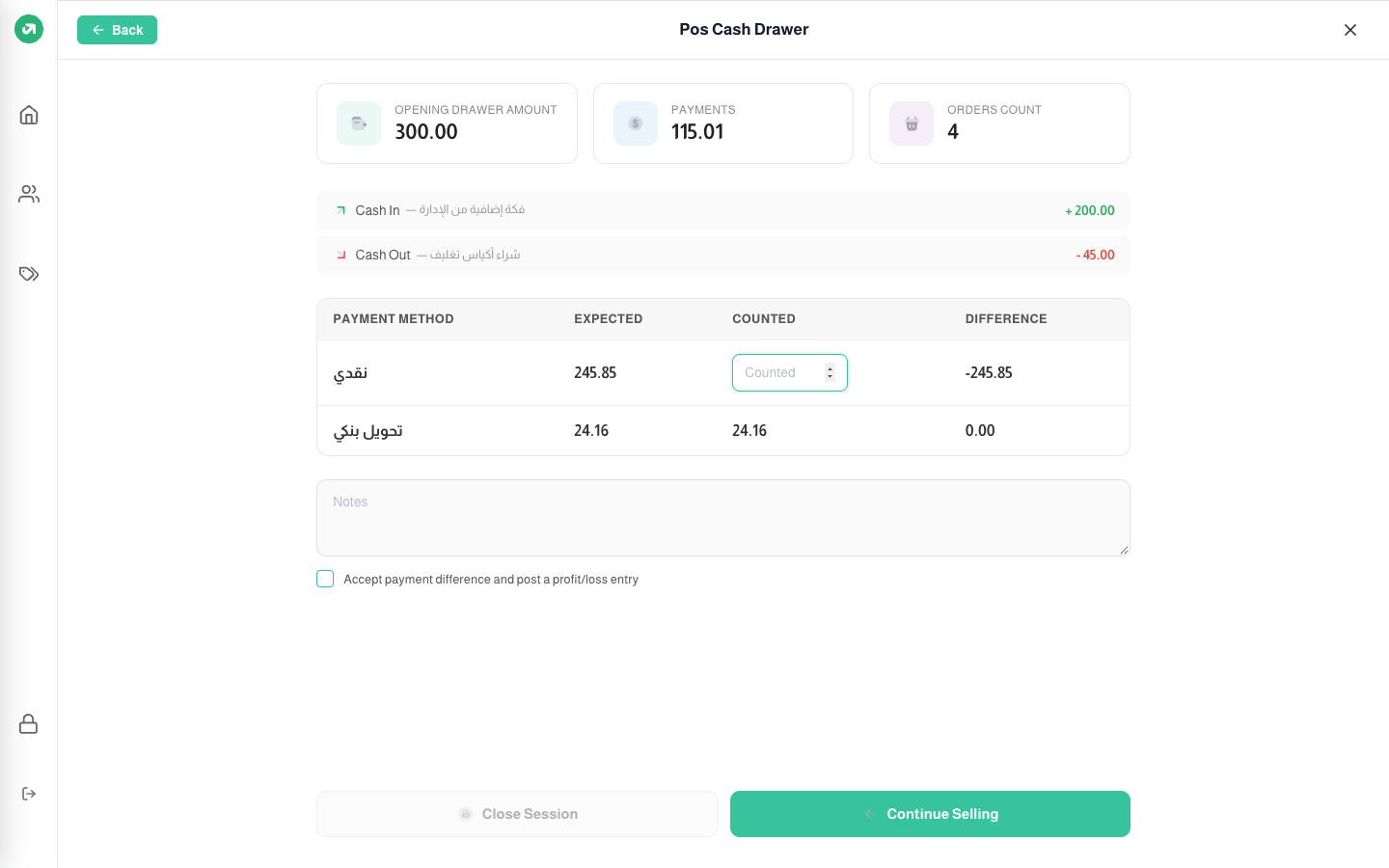
- At the top: opening amount, payments and orders count.
- Below them, the cash in and out entries with their reasons.
- The payments table: the expected amount for each method. For cash = opening amount + cash sales + cash in − cash out − cash refunds.
Steps
- Count the drawer and enter it in Counted on the cash row. The difference shows at once (negative for a shortage).
- If there is a difference, write a note and tick Accept payment difference and post a profit/loss entry.
- Press Close Session, then choose Close (stay logged in) or Close & logout.
- The session summary prints automatically.
On closing, the system posts the accounting entries for sales and payments, takes the goods out of stock, and posts the difference if you accepted it. Press Continue Selling to go back without closing.
Notes
- When deficit alert on close session is on and the counted cash is less than expected, the close button stays disabled until you write a note and accept the difference.
- When shifts are on and the shift is over, the Shift End message leaves closing the session as the only option.